Finalrentals Blog


Published in Guide Category.
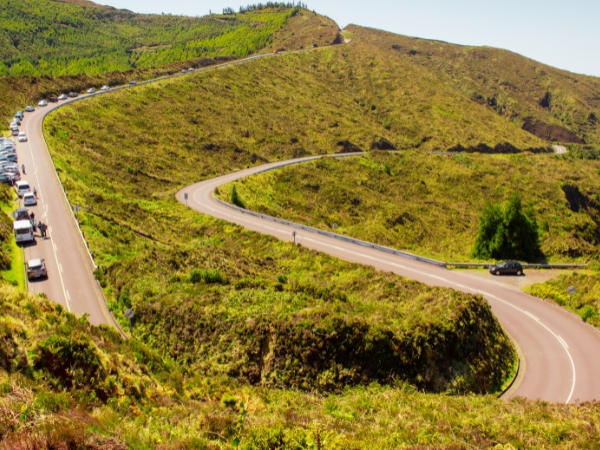
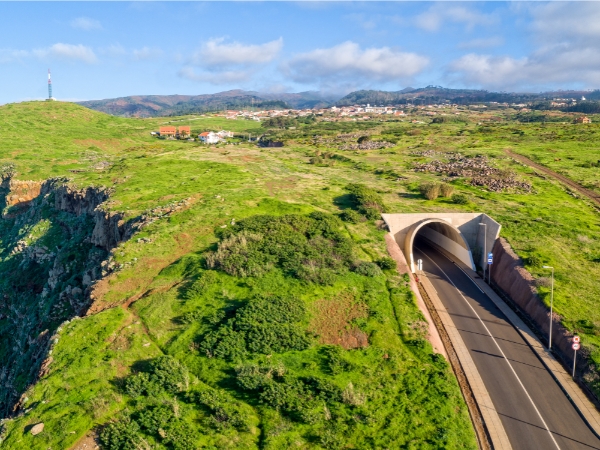
Driving with GPS in Madeira is extremely useful, but the fastest route is not always the easiest. Madeira rises sharply from the coast, while Funchal spreads across steep slopes. Roads across the island can be narrow and winding, and many modern express roads run through tunnels.
When you rent a car in Madeira, you may notice these differences on unfamiliar roads. A faster route might involve a steep residential street, a difficult junction or a tunnel exit that appears suddenly. A slightly longer route can mean wider roads, clearer signs and fewer difficult hill starts.
Before starting your journey, spend a minute checking the whole route rather than simply pressing "Start". Our guide explains how to avoid difficult GPS shortcuts, choose easier roads and navigate Madeira's tunnels and mountain routes.
Why the Fastest GPS Route in Madeira Can Be Difficult
Madeira has steep city streets, winding mountain roads and long tunnels. GPS in Madeira can calculate a valid route, but it cannot judge how confident you are on a difficult climb. You may find the quickest option harder than expected, especially when you are driving somewhere new.
Steep GPS Shortcuts Through Funchal's Residential Streets
Funchal rises from the Atlantic, so a shortcut that looks simple on a map may involve a steep climb. If you're new to driving in Madeira, the slopes around residential streets can surprise you.
Imagine driving a manual rental car towards your accommodation above central Funchal. Your app sends you onto a narrower road to save a little distance. Halfway uphill, traffic stops, and you need to restart without rolling backwards. You must control the brake, clutch, and accelerator while keeping an eye on the car behind you.
The suggested street might be completely legal, but you may still prefer a wider, gentler road. Saving 3 to 4 minutes is rarely worthwhile if the shortcut involves tight turns and repeated hill starts. Before turning into an unfamiliar street, compare the route with nearby regional roads.

Missed Turns When GPS Loses Signal in Madeira's Tunnels
GPS relies on satellite signals, which may disappear when you enter a tunnel. Your position can freeze on the screen even as you keep driving.
Suppose you're travelling from Madeira Airport towards Funchal along VR1. You enter one of Madeira's road tunnels while the app still shows your earlier position. Your next exit might be close when the map updates, leaving little time to change lanes.
Instead of trying to catch up with the screen, note your next exit before entering a tunnel. Watch the overhead signs and stay in your lane if you miss the turn. GPS in Madeira may take a moment to reconnect, but you can safely follow its new route afterwards. Never make a sudden lane change just to follow the original directions.
Mountain Passes Versus Modern Tunnel Roads
Between Ribeira Brava and São Vicente, VE4 crosses the island through modern tunnels. The Encumeada Tunnel alone is approximately 3.1 kilometres long. Older mountain roads around ER104, ER105 and ER228 take you through the Encumeada area instead. ER228 connects Rosário and Encumeada.
The difference is clear once you're driving. On the older roads, you'll encounter bends, climbs, and frequent speed changes. VE4 carries much of the north-south journey through tunnels, so you can avoid the longer mountain crossing. A mountain route can look reasonable when traffic changes the estimated journey time. However, choose the mountain road deliberately, rather than following it because the app suggests a shortcut.
How to Use GPS for Easier Driving Routes in Madeira
The best route starts with a destination you can actually reach by car. GPS in Madeira might lead you to an attraction's map pin rather than its visitor entrance or parking area. Check the last part of your journey before leaving, especially around older villages and walking trails.
Check Hotel Access and Parking Before Following GPS
A hotel's address doesn't always mean you can drive to its front door. Some traditional villages have narrow lanes that cars cannot reach. Jardim do Mar is a good example. You can drive to the village, but its old centre has narrow cobbled lanes better explored on foot.
Before arriving, ask your host where guests normally park and whether you'll need to walk the final stretch. Save the recommended parking point in your app instead of relying only on the property address. With GPS in Madeira pointing to the right car park, you can walk to your accommodation without an awkward detour.
Set the Correct Parking Destination for Tourist Attractions
A hiking trail's name doesn't always point to the place where visitors can park. The final access road may be closed to private cars, even if it appears on your map.
For the 25 Fontes walk, the PR6 trail starts around Rabaçal on ER105. Drivers normally stop at the upper Rabaçal car park. A barrier restricts private vehicles from continuing towards the forestry house, where the walking route begins. From the car park, you can continue on foot or use the authorised shuttle when operating.
Instead of entering only "25 Fontes", navigate to the Rabaçal car park. Once you've parked, follow the signs and current trail access rules. The same idea applies to viewpoints, beaches, and other attractions where parking is separate from the main visitor area.
Check Road Restrictions Before Accepting GPS Directions
A road can remain visible on a digital map long after access has been restricted. Rockfall, poor weather, or roadworks may change which sections you can use.
Cascata dos Anjos near Ponta do Sol shows why you should check. Access to the waterfall on the old ER101 is prohibited because of the risk of landslides. Even if you find it on a navigation app, never pass a closed barrier or ignore warning signs.
Before travelling, check Info Vias for regional road restrictions, tunnel incidents and traffic delays. Prociv Madeira can also help you check emergency information and closures. If your navigation app disagrees with a road sign, follow the sign. Don't take unpaved shortcuts or side roads to get around a closure.
Madeira Driving Routes Where GPS Needs Extra Care

Some of the most memorable drives cross steep hills or exposed mountain areas. Your journey may look short on screen, but the weather and road layout can change your plans. Consider these three routes when using GPS in Madeira, especially if it's your first trip.
Funchal to Pico do Areeiro: Avoiding Difficult Uphill Shortcuts
Getting from Funchal to Pico do Areeiro can involve some particularly steep local climbs. GPS might suggest a direct residential route, even when you would rather use wider regional roads.
One alternative to preview from central Funchal follows ER102, then ER203, before joining ER103 near Poiso. From Poiso, follow the signed ER202 towards Pico do Areeiro. Your starting point may change the best route, so check the road numbers beforehand and confirm there are no restrictions.
An automatic car can be helpful if you're not confident with manual hill starts. You won't need to use a clutch when restarting uphill, but you'll still need to control your speed downhill. When choosing an automatic car rental, consider the steep sections along your planned route, not just the distance.
São Vicente to Porto Moniz: Old Coastal Roads Versus Modern Tunnels
VE2 is the main express-road corridor between São Vicente and Porto Moniz. The older ER101 follows parts of the historic coastal route, including exposed sections near Seixal.
Around Véu da Noiva, you may notice an old cliffside road that was part of the modern route. Parts of the former São Vicente to Seixal alignment have closed following rockfalls. Stay on the signed VE2 unless another road is clearly open and permitted for use.
For coastal views, use the designated viewpoint and legal parking area instead of entering an old road. The modern tunnel corridor avoids many exposed sections, so you can keep your focus on the drive. If you're planning a longer trip to Porto Moniz, check your stops and parking areas before you set off.
Paul da Serra to Fanal Forest: When Fog Changes the Drive
You can leave Funchal in sunshine and find thick cloud on the high plateau. The PR13 Fanal walking route begins along ER209 on Paul da Serra. It crosses heights of approximately 1,130 to 1,420 metres, where mist is common around the Laurissilva forest.
Imagine approaching Fanal after a clear morning on the south coast. Your app still shows a normal arrival time, but fog makes it difficult to see the next bend. You may need to slow down and keep more space between your car and traffic ahead. Check the mountain forecast before leaving and watch for fog, rain, and strong winds. If you struggle to see the road ahead, stop somewhere safe and permitted and reconsider the trip.
Takeaway
The best journeys are not always measured by how quickly you arrive. Using GPS in Madeira is easier when you trust your own judgement alongside the directions on your screen. A few extra bends on a wider road may be far more enjoyable than a steep shortcut you never wanted. When the island changes from sunny coastline to misty hills, choosing a route you understand can make all the difference.
Rent a car in Madeira with Final Rentals to start your trip without leaving a rental deposit. The Collision Damage Waiver, Theft Waiver, and Third Party Liability cover are included, but damage cover has an excess and exclusions. Book and manage your car rental anytime. Download the Final Rentals app on Google Play and the App Store.
Frequently Asked Questions
What are the best Madeira navigation tips for using GPS in Madeira?
The best Madeira navigation tips are to download offline maps, preview the full journey, and follow road signs. Choose the right parking spot before you leave, especially for mountain walks and older villages. GPS may lose its position inside tunnels, so note your next exit before entering. Check road closures too, since an open map route does not guarantee open road access.
What are the easiest roads in Madeira for tourists?
The easiest roads in Madeira are generally the main routes like VR1, VE2, and VE4, especially when you're heading to your destination. Their major junctions and tunnels often avoid the tighter bends found on older roads. Follow signed regional roads where possible, and compare routes before accepting steep local shortcuts. You may still encounter hills and bends along the way.
Should you trust the fastest GPS route in Madeira?
Not always. The fastest route might include a steep climb, narrow lanes, difficult parking, or a temporarily closed section. Preview the suggested alternatives and choose roads that match your driving experience. Road signs and barriers always take priority over the app. If you miss a turn, continue safely and let GPS recalculate rather than changing lanes at the last moment.